Design is powerful in its ability to include some, and exclude others. When the design of a course is approached in a thoughtful and inclusive way, it creates an educational environment where all students have an opportunity to learn and demonstrate their mastery of the course content. Design that does not take into consideration the variety of ways students access online content differentially impacts certain students. If a course is not designed accessibly up front, some students with disabilities are burdened with the need to work with the disability service office to obtain access. They are immediately put at a disadvantage when compared to nondisabled students.
What Does It Mean to Create an Accessible Online Course
A well-designed course is more usable for all students. The design also takes into consideration that not all students navigate or access the online environment in the same way. This toolkit focuses on three key principles:
- Intuitive: The layout of the course is simple, consistent and predictable.
- Perceivable: The content is designed so that it can be perceived by a wide range of users, regardless of disability.
- Navigable: Course navigation does not assume that the student is using a specific device, such as a mouse. A user can navigate the course using the keyboard alone or with the use of assistive technology in ways that are equally effective.
Designing in ways that consider these principles will go a long way toward inclusion and access for students with disabilities. This toolkit is not meant to be comprehensive. It also does not address specific learning management systems (LMS). You are encouraged to also consult the documentation for your particular LMS to see if there are tips and tools to enhance accessibility.
Learning management systems vary in terms of their accessibility. If the learning management system you are using is not accessible to students who use assistive technology or navigate using the keyboard alone, then your content will be inaccessible to these students even if you design it well. Consider contacting your campus disability resource office or instructional design support to ask about the LMS your campus uses in terms of its accessibility. If you plan to use a system other than the one adopted by your campus, make sure you are choosing one that is most accessible for your students.
In a prominent place in your course, include a statement that informs those students who might experience barriers that you are committed to creating an accessible online course. Include information about how to request accommodations. Your college or university may have a recommended or required statement. If not, here are a couple of options for you to consider.
Sharing course content in MS Word is common and can be simple and effective. As you design MS Word documents, make sure you are taking accessibility into account.
Creating Accessible MS Word Documents
Be sure do the following:
- Use headings (created by using the styles tool) to structure the document.
- Add alternative text to images.
- Create links by using meaningful text descriptions.
- Avoid the use of SmartArt.
- Avoid adding text boxes.
- Avoid putting important information in headers or footers.
The tutorials provided below will take you through the process of implementing these suggestions.
Creating Accessible PDF Documents
PDFs can provide an accessible way to provide content. If not created correctly, though, they can be totally inaccessible to people who use screen readers.
Here are a few tips to get you started:
- Start with an accessible source document. By following the previous suggestions for creating an accessible MS Word document, you are on your way to creating an accessible PDF.
- Save the MS Word document to PDF by choosing, Save as PDF rather than printing to PDF.
- Simple documents should convert pretty well from MS Word to PDF. More complex documents may need to be checked for accessibility and even remediated for accessibility.
- If you have a Professional version of Adobe Acrobat, you can run an accessibility check.
- You may also want to check with the disability resource office on your campus to see who might be able to assist with making sure your PDF documents are accessible.
If you are using PDFs that were created by someone else, check to make sure they are accessible.
- Can you highlight the text on the page? If not, it may be an image of the text instead of real text.
- Older PDFs created by scanning an article are often purely an image.
- Work with someone on your campus to determine the best approach to making these documents accessible.
More Resources: Creating Accessible PDF Documents
When you use MS PowerPoint to teach online you may be using it in a variety of ways.
- Providing it for students to download it to view on their own computer.
- Loading it into the LMS so that students view it as a slide presentation there.
- Showing it during a live video conferencing session.
No matter the end product, there are several things that need to be considered as you create the presentation.
- Choose a design template that offers good contrast.
- Avoid starting with a blank slide and adding text boxes.
- Instead, choose the layout that fits your slide design.
- Avoid the “Design ideas” presented by PowerPoint. Some are accessible but many are not.
- Look at the “outline view” of the slide to see if the text on your slide is visible there.
- Describe images, charts and graphs with alternative text.
- Use sans serif fonts and make sure your text is 24-point or larger for online classes (or 28-point or larger for face-to-face classes).
- Create an accessible PDF version of the PowerPoint for students to download. This version will be more accessible to screen reader users. To do so, choose Save to PDF instead of printing to PDF.
The resources below will walk you through these and other steps so that you can create an accessible slide presentation.
More Resources: Creating Accessible MS PowerPoint Presentations
Without alternative text, a blind person who is using a screen reader will not know what an image is. The screen reader will just say “graphic”. Most learning management systems offer the option to add alternative text. When you add a description, simply describe what is in the image. There is no need to say “image of” or “picture of”.
More Resources: Accessible Images
Providing clear wording for the text in a link can be challenging. In an effort to be concise, sometimes we sacrifice clarity. If a student using a screen reader is in your course, they have the option to scan links to find what they need. If links are not described adequately, scanning the course content in this way is not productive. Providing clear links makes your course more usable for everyone. Some of the more common problems seen in providing links are listed below along with suggestions for correcting these errors.
| Common Problem | Sample of Problem | Suggested Solution |
|---|---|---|
| When documents are provided in multiple formats, links are given as format name only. |
Homework: |
|
| Introductory sentences are provided with links to “more” at the end of it. | Professor Wins Award for Accessible Course Design More… | Professor Wins Award for Accessible Course Design >> |
| A similar format to the above is often seen following a longer introductory paragraph. | Anytown University is moving all of its instruction online in order to reduce the spread of COVID-19. We will continue to provide updates to our campus community. Details… | Anytown University is moving all of its instruction online in order to reduce the spread of COVID-19. We will continue to provide updates to our campus community. Full article: Anytown University Response to COVID-19 |
| One of the most common problems is the use of the phrase “click here” as a link to more information. | Click here to go to the latest news on your university. | Get the latest news on your university>> |
| A full URL is provided without meaningful text as part of the link. | Here’s my latest blog entry: http://myblog.really-really-long-URL-123412345 | My Latest Blog Entry |
Video content can be much more engaging than more static content, adding great benefit to an online course. At the same time, if access is not considered, video content can present barriers for many students. So what needs to be considered to make sure video content is accessible?
- For videos embedded in a course, the video player needs to be accessible by keyboard and the controls need to be labeled properly so that a screen reader user can access all of the video controls.
- The video will need to be captioned.
- The visual content will need to be described.
- A transcript will need to be created that includes the captions and the descriptions of the visual content.
Accessible Video Players
The use of accessible video players is typically a decision made on a college-wide level. If you are using an LMS that allows you to embed your own videos, a good practice is also to include a link that goes directly to the source video (e.g. YouTube, Vimeo, etc.)
Using Captioned Videos
When choosing a video that has been created by someone else, make sure it is captioned. Automatic transcription does not provide equal access. You can learn more about why this is the case by reading Explore Access: Automation Is Not Equal Access. See the next section for more details on choosing captioned videos and captioning your own videos.
Audio Description
Audio description refers to providing information about the visual aspects of a video to someone who is blind or who has low vision. Audio description can be provided as part of the general narration or can be added after the fact. If the video is simply a recording of you providing a lecture, then there would be little need for audio description. If you are also showing slides, you’ll want to describe what is in the slides. See more details about creating audio descriptions in Sharing Accessible Videos – Audio Description.
Providing a Transcript
Once you have your transcript for the captions and the audio descriptions, you can combine the two to create a document that will make your video accessible to students who are DeafBlind. Simply create an accessible MS Word document with this content and provide a link to it below the video.
Choosing Captioned Videos
When choosing a video that has been created by someone else, make sure it is captioned. As mentioned above, automatic transcription does not provide equal access. Transcription created by artificial intelligence often has many inaccuracies. Even when it is fairly accurate, it lacks punctuation and capitalization, making it very difficult to follow. Below are some suggestions for determining if videos are truly captioned and searching for videos that are.
Checking a Video for Captions
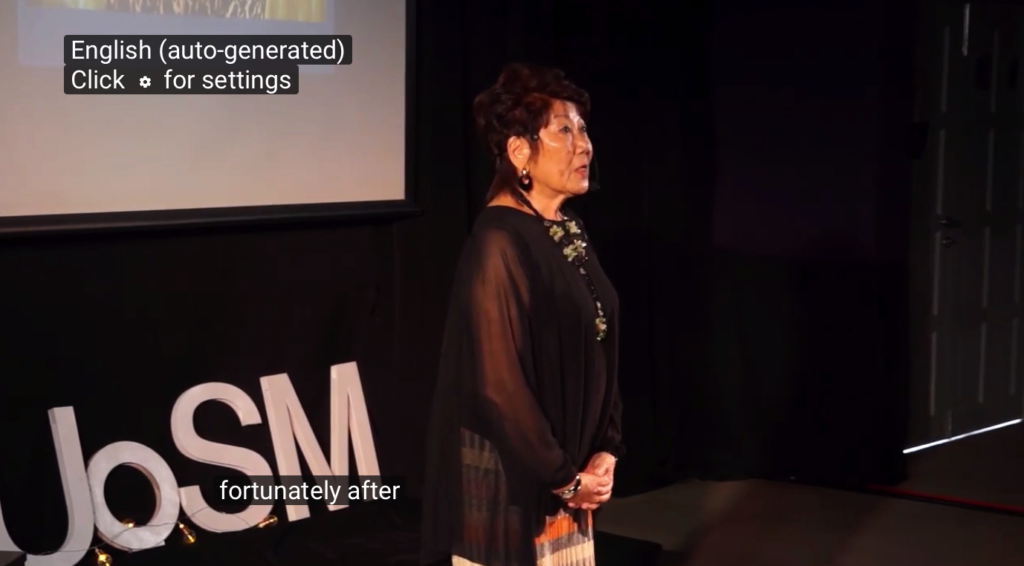
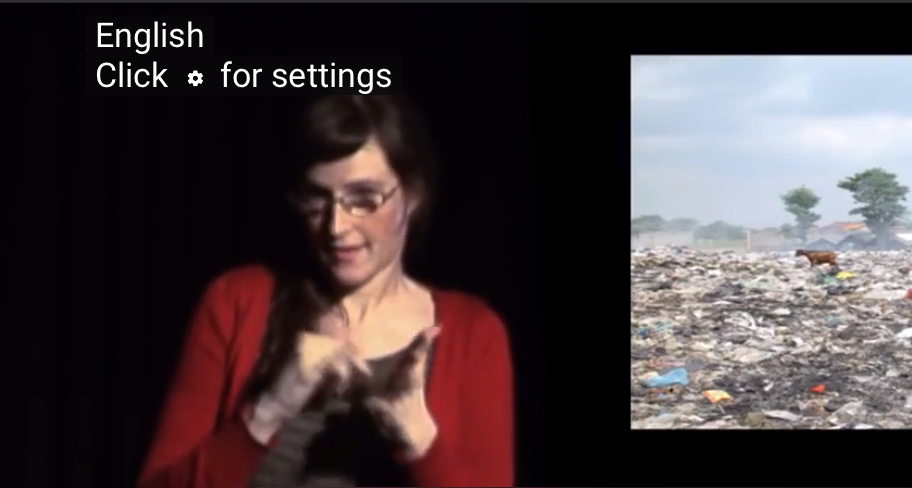
To check to see if a video is truly captioned, click on the “CC” button at the bottom of the video. Immediately you will see this information displayed in the top left corner of the video.
In this first image, we see the text that displays when only an auto-generated transcript is available in the top left corner.
In this second image, the text that appears when a video has actual captions is shown. Even when you see this, it is a good idea to check for accuracy before sharing the video.
Finding Captioned Videos
If you are searching for video content to share with your students, you can narrow your YouTube search to just those videos that are captioned. Simply go to youtube.com and enter the topic you want to search for. After you select the search button, you will see a button appear labeled Filter. Select that button and open up the options. Then, under Features select Subtitles/CC. This will bring up only those videos that have a caption file uploaded.
Again, make sure to check for accuracy before sharing the video.
Captioning Videos You Do Not Own
If there is a video you want to use that you do not own and discover it is not captioned (or not captioned well), one option is to use the 3Play Media Plugin. This plugin allows you to select a YouTube video, add the captions, and then share a link to the video that has the captions overlaid over the original video.
Captioning Your Own Videos
If you have created your own video, you will need to caption it or have it captioned. There may be professionals on your campus who assist with this. Contact your disability resource office, ICT department, or instructional designers to check. If you do not have support available on your campus, it is not difficult to add your own. If funds are available, there are also companies that you can contact to outsource this.
If you plan to add your own, assuming your video is housed on YouTube, you can approach this a few different ways.
- Create a transcript of all of the video content, upload that to YouTube and allow YouTube to sync the transcript with the video.
- Upload your video to YouTube and allow it to create an automatic transcript for you, then go in and edit the transcript by making corrections and adding capitalization, punctuation, and identifying speakers.
- Create a transcript and use a tool that allows you to add timings to your transcript. Upload the caption file to YouTube.
The resources below provide you with guidance for captioning your videos. Online captioning resources are also provided.
More Resources: Captioning Your Videos
Tutorials on Captioning
- NCDAE: Captioning YouTube Videos
- DCMP: Captioning Key
- University of Washington: Captioning Your Own Video
- YouTube Captioning Tutorial
Captioning Tools
As stated in a previous section, the term audio description refers to providing information about the visual aspects of a video to someone who is blind or who has low vision. Videos vary in terms of how much visual information they provide and how much description is needed. The following will help you consider what aspects of a video need additional audio description.
- Are there sections of the video that provide content in text only (i.e. credits, section titles, statistics, etc.)?
- Are the names and/or titles of speakers listed under the speaker?
- Are there presentation slides that are being shared that are not spoken by the narrator?
- Are there other visuals that add to the content of the video?
- Is something being demonstrated in the video?
All such content will need to be described in order for the video to be accessible. Good audio descriptions simply state in words what a blind person would miss visually. The resources below will assist you in creating good audio descriptions.
More Resources: Creating Audio Descriptions
If you have a course that has several modules, it is helpful to organize each module in a similar way. This predictability helps many students navigate the course and makes it less likely that students will miss an important activity. Below is a sample organization that illustrates this consistency.
Universal Design 101
(Each item in the lists would actually be a link.)
Module 1: An Introduction to Universal Design
- M1 Video
- What is Universal Design? (YouTube) – CC
- What is Universal Design? (YouTube) – AD & CC
- What is Universal Design? Transcript (DOC)
- M1 Reading Assignments
- A Historical Perspective of Universal Design (PDF)
- Universal Design as a Philosophical Framework (PDF)
- The Principles of Universal Design (PDF)
- List of additional suggested readings (PDF)
- M1 Activities
- M1 Reaction Paper (DOC)
- M1 Questions to Ponder (Discussion Board)
- M1 Self-Test (DOC)
Module 2: Universal Design in Postsecondary Settings
- M2 Video
- Universal Design in Postsecondary Education (YouTube) – CC
- Universal Design in Postsecondary Education (YouTube) – CC & AD
- Universal Design in Postsecondary Education Transcript (DOC)
- M2 Reading Assignments
- Hidden Disabilities and Disclosure (DOC)
- Students with Learning Disabilities in Higher Education: A Growing Population
- Models of Universal Design (PDF)
- M2 Activities
- M2 Reaction Paper (DOC)
- M2 Questions to Ponder (Discussion Board)
- M2 Self-Test (DOC)
Notice that the link to different items also includes information about the format of that item. When a link does not include a format, most people would assume that would take a person to a web page.
Encourage students to use good discussion board etiquette. Using good subject headings is helpful to everyone. For example, instead of Question using a heading such as A Question about Module 1. This will help other students determine where to focus their time and energy in reading the discussion posts and be able to scan for the information they need. For more specific information, consult these Discussion Board Guidelines. You are also welcome to adapt and share those guidelines with your students.
Do you plan to meet with your class using a video conferencing tool? This can be a good way to connect with students remotely. There are several things to keep in mind to create an accessible experience for all students.
Selecting an Accessible Video Conferencing Solution
Perhaps your university has adopted a video conferencing tool already. You may want to check with your disability resource office or instructional technology department to make sure it is fully accessible. If you are selecting your own video conferencing platform, the following questions will help guide you toward selecting an accessible video conferencing tool.
- Does the company that makes the product have information about accessibility on their website?
- Do they offer keyboard shortcuts to navigate the application?
- Does the application have a way to provide captions?
- Does the application offer the option to connect by either computer or phone?
- Can you find information about the accessibility of this product from organizations other than the vendor themselves?
- Is this product being used by organizations that prioritize accessibility?
If you can also have the application tested by someone who knows about digital access, that is ideal.
Planning for Access
As you plan to lecture using video conferencing, remember that not all people will access your lecture the same way. Students who are deaf or hard of hearing may need captions or an ASL interpreter. Accessing the lecture using an ASL interpreter requires higher bandwidth than accessing just the audio of the lecture or watching a video with relatively little movement. Deaf students who live in rural areas may need support finding a location where they have that level of Internet access. Students who access the computer using assistive technology or the keyboard alone may find learning the keyboard shortcuts (if they do exist) to be time consuming. Offering the option to connect by phone and sending any visual materials such as PowerPoint slides in advance is a good practice. Also providing descriptions of what you are sharing visually is a good practice whether remote or face to face. This way, blind students and those joining by phone can follow along more easily.
During Your Class
Here are some tips for providing access during your lecture:
- Provide multiple means for people to ask questions (i.e. chat tool, unmuting the user so they can ask questions, and emailing you questions).
- If you are showing slides, announce when you are moving to the next slide.
- Make sure students have an accessible version of the slides in advance.
- Don’t assume that everyone can access the slides during your presentation. Read the content or provide all of the content as part of your lecture.
- If a captioner is joining to provide captioning, make sure the captioning is working properly before beginning your lecture.
- Record your lecture so that students who lose Internet connection can access it later.
More Resources: Access and Video Conferencing Tools
A highly accessible online course will remove the need for many accommodations. If you take the time to follow the suggestions in the previous sections and you are using an accessible LMS, students with disabilities will be included proactively. In fact, sometimes in a well-designed online course, students with disabilities participate seamlessly and do not even need to connect with the disability resource office.
Common Accommodations in the Online Environment
Timed Exams
Timed exams, in both the face-to-face and online, present barriers to many students. When timed exams are used, extended time is a reasonable accommodation for many students. This is typically determined by the campus disability resource office who will send a notification to you. When you get such a notification, you will need to provide a longer time for that student to take the exam or quiz.
In some of the more robust learning management systems, there is a way to provide this accommodation for a specific student. If your LMS does not provide this option, you may have to create a separate exam for the student and set the appropriate length of time.
If you have questions about implementing the accommodation, contact your campus disability resource office.
Captioning
Even if you use videos that are captioned already, there are some situations where captioning will be needed as an accommodation. If you are using video conferencing technology to deliver a live lecture, your lecture will need to be captioned for a deaf or hard of hearing student. Work with your disability resource office to make this arrangement. They will probably need to provide access to the lecture to a live captionist and will work with you to get the appropriate link so they can log in and provide captioning.
Other situations where captioning may be needed as an accommodation are with the use of chat or collaborative tools that include audio (i.e. VoiceThread or Kollective).
Sign Language Interpreters
Similar to captioning, provision of remote sign language interpreters may be requested when lectures are provided online. Again, your disability resource office should take the lead on arranging this, but may need to have access to the log in information so that the interpreter can join in.
Alternatives to Inaccessible Course Components
Other accommodations in the online environment are typically a response to documents not being designed accessibly or instructors choosing applications that are not accessible. This might include the LMS itself or tools within the LMS such as chat or the exam tool. This could also include requiring students to visit a website that is inaccessible. Being proactive and checking for accessibility of applications and web resources will improve the experience of your students and reduce the need for retrofitting.